Shared local state
Keep projects, blockers, screenshots, and run history in one local tracker so you can leave Codex running and return without rebuilding context.
Maestro keeps your local queue, MCP handoff, and control center aligned so Codex can keep moving while you return to live context instead of rebuilding the story from scratch.
Install
npm install -g @olhapi/maestroBootstrap workflow
maestro workflow init .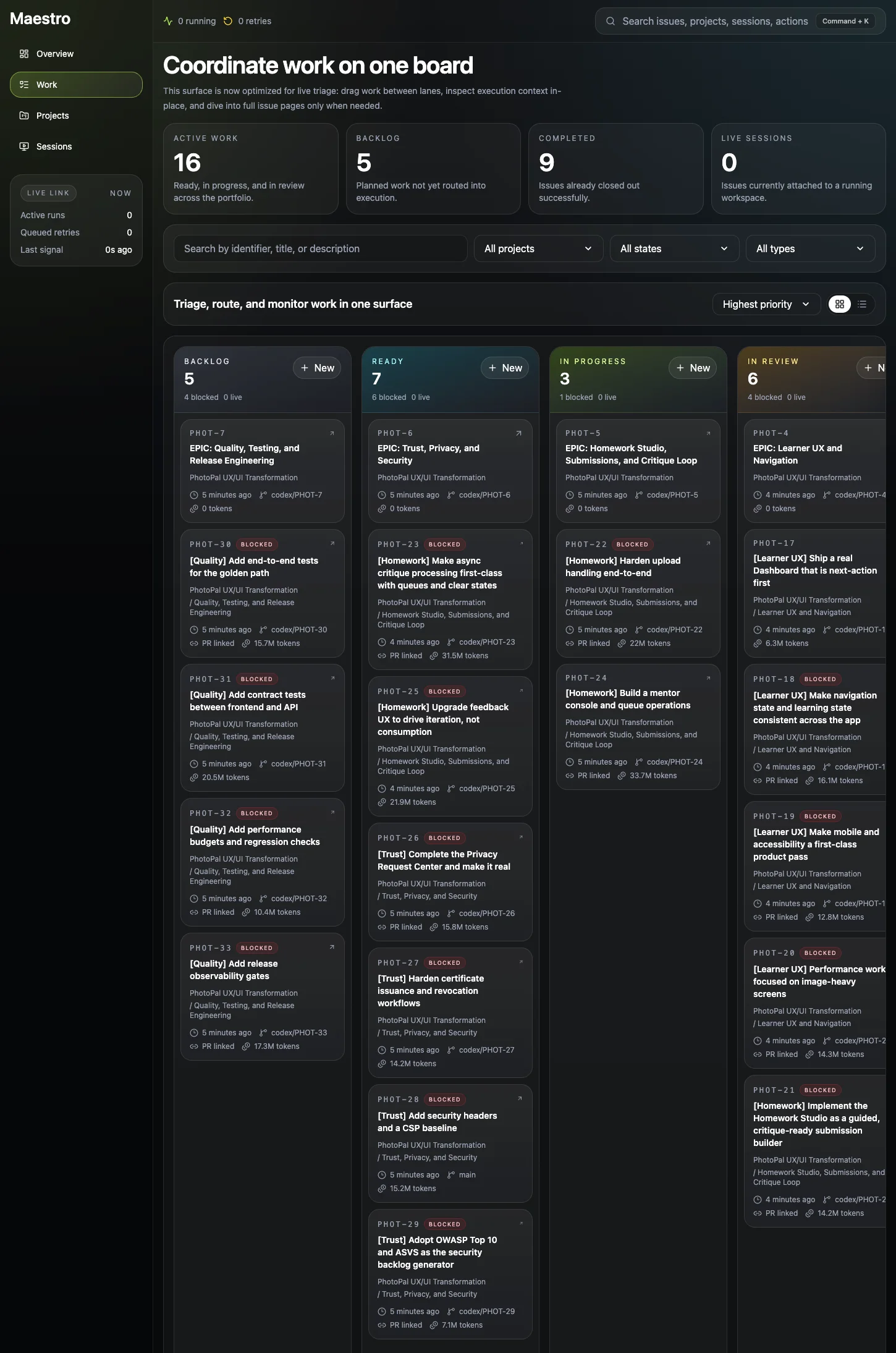
Maestro earns the handoff by keeping the tracker, MCP bridge, and runtime supervision on the same machine. Codex can keep moving without turning into a black box.
Keep projects, blockers, screenshots, and run history in one local tracker so you can leave Codex running and return without rebuilding context.
Expose that same queue through `maestro mcp` so Codex sees the work and state the daemon is actually supervising.
Let Maestro keep routing ready issues while you watch retries, sessions, logs, and live state from the control center.
The walkthrough is about developer re-entry: read queue pressure, route Codex work, inspect a single run, and get back out without babysitting every issue.
Overview keeps running Codex sessions, retries, live token load, execution health, and token burn visible so you can decide whether to step in or let the queue keep moving.
The board keeps blockers, live sessions, token burn, and the shared composer together so you can reroute work and get back out quickly.
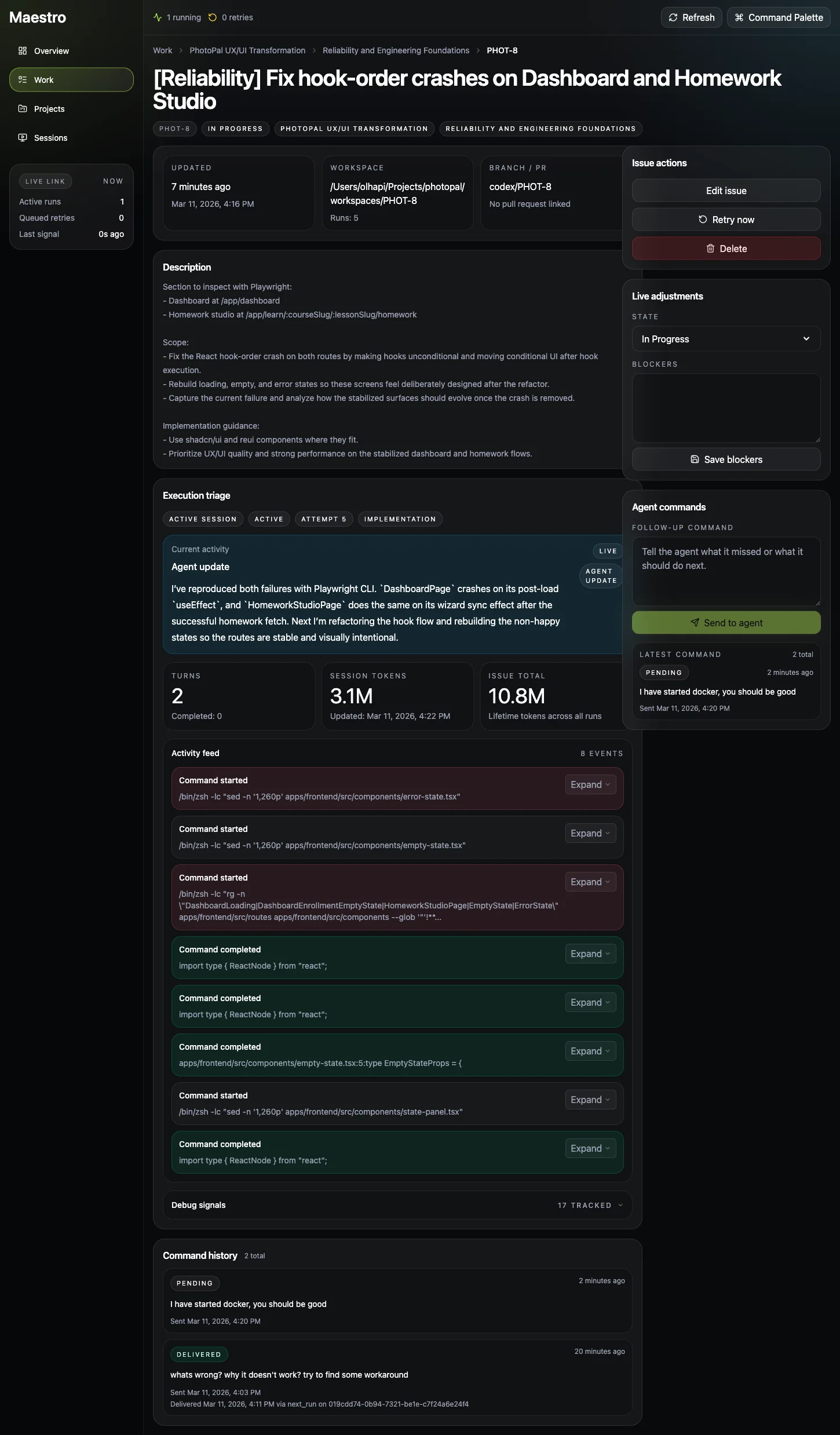
When one Codex run needs attention, the issue page keeps transcript, blockers, screenshots, branch state, and commands in one dense control panel.
Sessions is the fast path when multiple repos or issues are moving and you only want to intervene where the Codex loop is actually stuck.
Overview keeps running Codex sessions, retries, live token load, execution health, and token burn visible so you can decide whether to step in or let the queue keep moving.
The board keeps blockers, live sessions, token burn, and the shared composer together so you can reroute work and get back out quickly.
When one Codex run needs attention, the issue page keeps transcript, blockers, screenshots, branch state, and commands in one dense control panel.
Sessions is the fast path when multiple repos or issues are moving and you only want to intervene where the Codex loop is actually stuck.
Install the runtime, write the repo contract once, then launch the daemon so Maestro can keep reading ready work while Codex keeps moving and you move on to review, coding, or planning.
Install
Install the local runtime once, then use the same command in every repo you want to supervise.
npm install -g @olhapi/maestroBootstrap workflow
Set up the repo contract once so Maestro can keep making the same handoff decisions while you are elsewhere.
maestro workflow init .Start Codex orchestration
Start the daemon and embedded control center so the queue keeps moving while status, retries, and sessions stay visible.
maestro runStart with install and quickstart, then use the docs to supervise Codex, tune its behavior, or debug it when something drifts.
Get from install to a live Codex loop, then learn what keeps running after the initial handoff.
Tune how much autonomy Maestro gives Codex, how it retries, and which guardrails stay in place.
Check queue health, inspect live runs, and debug the daemon without guessing what happened.