Architecture
Understand how the local store, MCP bridge, and daemon stay aligned so Codex can keep moving and you can still trust the loop.
Runtime layers
The current codebase is organized around five connected runtime layers:
- a SQLite-backed local store that persists projects, issues, workspaces, sessions, commands, and runtime events
- a local project service that keeps every project and issue in the SQLite store
- an orchestrator plus Codex runner that turns queued issues into workspaces and Codex sessions
- a private MCP daemon that
maestro mcpbridges over stdio - a public HTTP server that serves the embedded dashboard UI plus JSON and WebSocket APIs on the default port unless you override
--port
How work moves through the live loop
The shortest operational view of the system: attach path, optional HTTP surface, local store, local project management, and Codex execution.
This diagram is derived from the current runtime shape in cmd/maestro and the internal runtime packages, then captured as a static asset for the docs site.
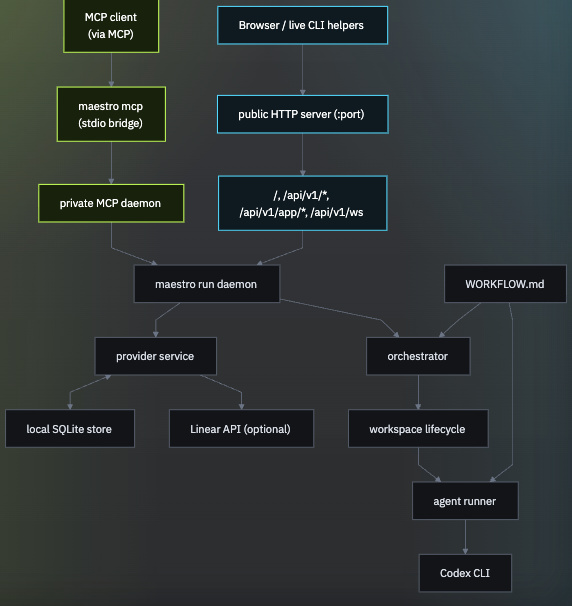
Local store first
Maestro keeps all work local. Projects, epics, issues, comments, and attachments live in the SQLite database, then flow through the same queue state, runtime events, sessions, dashboard views, and MCP tools.
WORKFLOW.md still controls orchestration behavior, and its tracker.kind remains kanban. That is the local tracker used for every project.
MCP attach model
maestro run is the long-lived daemon for a given database. It owns:
- the SQLite store and runtime persistence
- the local issue service and orchestrator runtime
- the private loopback-only MCP transport endpoint
- the public HTTP server and embedded dashboard, which default to port
8787unless you override--port
maestro mcp does not start a separate daemon. It attaches to the live maestro run process for the same store and bridges that daemon over stdio for MCP clients.
Operationally, that means:
- start
maestro runfirst - point
maestro mcpat the same--db - expect an explicit error if no live daemon exists for that store
Workflow-driven orchestration
WORKFLOW.md is the repo-local source of truth for:
- tracker settings
- workspace root
- hook commands and timeout
- Codex concurrency, mode, and dispatch behavior
- optional review and done phase prompts
- Codex command and sandbox settings
- the prompt template rendered for each issue
The orchestrator does not guess its way around missing repo context. It reads the workflow file, then turns local queue state into per-issue workspaces and Codex runs.
If you need to import work from another system, use MCP prompts or scripts to create matching local Maestro projects and issues first. The runtime itself does not sync a remote system into the store.
Why the architecture stays local-first
Keeping the architecture local-first makes the system easier to inspect, debug, and trust.
- the control plane stays on your machine, so the automation loop remains close to the code and config you are actually running
- the observability surface is plain HTTP JSON plus an embedded dashboard, so you can understand system state with familiar tools
- extensions stay as local shell commands, so customization remains easy to version, audit, and replace
That keeps the operational footprint small and makes the full loop easier to reason about from a single repo checkout.